Ring Group vs Call Queue: 5 Differences and When to Use Each
Ring groups and call queues both send calls to a team, but they behave very differently when everyone is busy. Here is how to choose the right one.

VoIP Anchor is independent. No provider pays to be featured or reviewed. Our disclosure
On this page
- What is a ring group?
- What is a call queue?
- Ring group vs call queue: the key differences
- When to use a ring group
- When to use a call queue
- Which should you choose?
- Using a ring group and a call queue together
- How to set up a ring group or call queue
- Tips to get the most from them
- Frequently asked questions
- Final thoughts
When a customer calls your main number, who should pick up? And what happens if everyone is already on a call? With a VoIP phone system, you have two common ways to send calls to a team: a ring group or a call queue. They sit next to each other in most settings menus, but they behave very differently when your team is busy.
This guide compares ring group vs call queue in detail. It covers how each one works, the ring strategies you can choose, the key differences, real examples for sales, support and small offices, and step-by-step tips for setting them up.
Key takeaways
- A ring group rings several phones at once or in order. If nobody answers, the call goes to a fallback such as voicemail.
- A call queue holds callers in line when everyone is busy and connects them to the next free person.
- Ring groups suit small teams and low call volumes. Call queues suit support teams, busy periods and anyone measured on wait times.
- Many businesses use both, often behind an IVR menu.
What is a ring group?
A ring group, sometimes called a hunt group, is a set of phones or users that ring when a call comes in. The first person to answer gets the call. Members can be desk phones, softphones on laptops or mobile apps, so a ring group works for office and remote teams alike.
Ring strategies
Most phone systems let you choose how the phones in a ring group ring:
- Simultaneous (ring all): every phone rings at once. The fastest way to get a call answered.
- Sequential (linear): phones ring one after another in a fixed order. Useful when one person should always get the first chance, such as a receptionist with backup from colleagues.
- Round robin: calls rotate through the group, starting with the next person each time, so work is shared evenly.
- Longest idle: the person who has been off the phone the longest rings first. Good for fairness in sales teams.
What happens when nobody answers
If no one picks up within a set time, the call moves to a fallback. Common choices are:
- Voicemail, ideally one that is emailed to the team
- Another ring group, such as managers or a backup office
- A mobile number for out-of-hours cover
- An IVR menu or a call queue
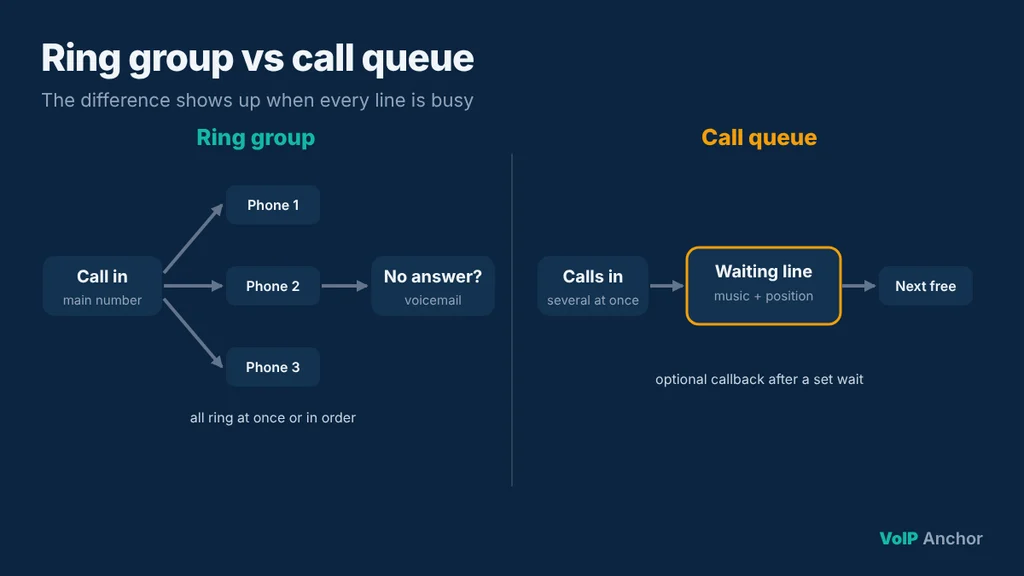
The key point is that callers don’t wait in line. Either someone answers quickly, or the call moves on.
What is a call queue?
A call queue holds callers in a virtual line when all agents are busy, then connects each caller to the next available person in order. While they wait, callers hear hold music or recorded messages, and often an announcement of their position in the queue or an estimated wait time.
Queues add features that ring groups usually don’t have:
- Hold music and recorded messages that can share useful information while callers wait.
- Position and wait-time announcements so callers know what to expect.
- Callback options, so callers can hang up and keep their place, then receive a call back.
- Agent login and logout, so only people on shift receive calls.
- Wrap-up time between calls so agents can finish notes before the next call arrives.
- Overflow rules that send calls elsewhere if the wait gets too long or the queue gets too full.
- Reporting on wait times, abandoned calls, service levels and agent performance.
How agents receive queue calls
Queues use distribution strategies similar to ring groups: ring all available agents, round robin, longest idle, or skills-based routing where calls go to agents with the right skill or language. The difference is that when no agent is free, the caller waits instead of being sent to voicemail.
Ring group vs call queue: the key differences
| Ring group | Call queue | |
| When everyone is busy | Call goes to voicemail or another fallback | Caller waits in line for the next free person |
| Caller experience | Quick answer or voicemail | Hold music, position updates, callback options |
| Best call volume | Low to moderate | Moderate to high, with peaks |
| Agent control | Members always receive calls | Agents log in and out of the queue |
| Reporting | Basic call logs | Wait times, abandoned calls, service levels |
| Setup effort | Simple | More settings to plan |
The simplest way to remember it: a ring group answers the question “who should ring?”, while a call queue also answers “what should happen while callers wait?”
When to use a ring group
- Small offices where a few people can answer the main line between other tasks.
- Sales teams where the first available rep should grab a new lead quickly, before the prospect calls a competitor.
- After-hours or on-call lines that ring a manager’s desk phone and mobile together.
- Departments with low call volumes, such as accounts or HR, where callers rarely need to wait.
- Remote teams spread across locations who all answer the same number from apps.
Example: a five-person estate agency
Calls to the main number ring all five agents at once on their desk phones and mobile apps. If nobody answers within 20 seconds, the caller hears a short message and leaves a voicemail, which is emailed to the whole team. Simple, fast and nothing to manage.
When to use a call queue
- Customer support and help desks where several calls arrive at once.
- Busy periods, such as Monday mornings, product launches or seasonal peaks, when you’d rather callers wait briefly than hit voicemail.
- Teams measured on service levels, for example answering 80% of calls within 30 seconds.
- Contact centres that need agent logins, wallboards, skills-based routing and detailed reports.
- Order lines and bookings where every missed call could be lost revenue.
Example: a growing software company’s support line
Support calls go into a queue staffed by eight agents who log in at the start of their shift. Callers hear their position and a message pointing to the help centre. After three minutes, they’re offered a callback. Managers check daily reports for abandoned calls and adjust staffing for busy hours.
Which should you choose?
Use this quick guide to match the option to your situation:
| Your situation | Best option |
| 2–5 people share one main number | Ring group |
| Sales team chasing inbound leads | Ring group (simultaneous or longest idle) |
| Support team with frequent overlapping calls | Call queue |
| You need to measure wait times and service levels | Call queue |
| Separate sales and support teams | Both, behind an IVR menu |
| After-hours emergency cover | Ring group to on-call staff |
Using a ring group and a call queue together
Many businesses combine them through an IVR menu. For example, “press 1 for sales” sends callers to a ring group so the first free rep answers, while “press 2 for support” sends them to a call queue.
Other common combinations:
- Queue with ring group overflow: if the support queue wait passes five minutes, calls overflow to a ring group of team leads.
- Ring group with queue fallback: a small team’s ring group sends unanswered calls into a short queue rather than straight to voicemail.
- Time-based routing: during business hours calls go to a queue; after hours they go to an on-call ring group.
How to set up a ring group or call queue
- Map your call flow. Decide which numbers and IVR options lead to each group or queue, and what happens after hours.
- Choose members. Add the users or devices that should receive calls, and decide whether remote staff should be included through their apps.
- Pick a ring or distribution strategy that matches how you want work shared.
- Set timings. Choose how long phones ring before moving on, and for queues, the maximum wait time.
- Configure fallbacks and overflow. Decide where unanswered or long-waiting calls go.
- Record greetings and hold messages. Keep them short and useful.
- Test every path from a mobile phone, inside and outside business hours.
Tips to get the most from them
- Keep ring times short. Around 15–25 seconds before moving to the next step stops callers hearing endless ringing.
- Always set a fallback. Never let calls ring out with nowhere to go.
- Set a maximum wait time for queues and offer a callback or voicemail when it’s reached.
- Use useful hold messages. Share opening hours, your website or answers to common questions instead of looping music.
- Keep queues staffed at peak times. Use reports to see when calls spike and schedule people accordingly.
- Review reports monthly. High abandonment means you need more people at peak times or a callback option.
- Revisit the setup as you grow. A ring group that works for three people may need to become a queue at ten.
Frequently asked questions
What is the main difference between a ring group and a call queue?
A ring group rings several phones and sends unanswered calls to a fallback, while a call queue holds callers in line until someone is free.
Is a hunt group the same as a ring group?
Mostly, yes. “Hunt group” is the older term, often used for groups that ring phones in order until one answers.
Which is better for a small business?
A ring group is usually enough for small teams with modest call volume. Add a call queue once callers regularly reach voicemail during busy periods.
Can I use a ring group and a call queue together?
Yes. Many businesses use an IVR to send sales calls to a ring group and support calls to a queue, or overflow a queue to a ring group.
Do call queues cost extra?
It depends on the provider. Some include queues in standard business plans, while others reserve advanced queue features and reporting for higher tiers or contact centre add-ons.
How long should callers wait in a queue?
There’s no fixed rule, but long waits increase hang-ups. Many businesses offer a callback or voicemail after a few minutes.
Final thoughts
The ring group vs call queue decision comes down to one question: what should happen when everyone is busy? If unanswered calls can go to voicemail, a ring group is simple and fast. If callers should wait for the next available person, use a call queue.
Start with the simplest setup that works, watch your call reports, and add queues, overflow rules and callbacks as your call volume grows. Most growing businesses end up using both.