
How a VoIP IVR System Works: Setup, Features & 7 Tips
“Press 1 for sales” is just the start. Here’s how a VoIP IVR system works behind the scenes, what it can do for a small business, and how to set one up well.

VoIP Anchor is independent. No provider pays to be featured or reviewed. Our disclosure
On this page
“Thanks for calling. For sales, press 1. For support, press 2.” You’ve heard it hundreds of times. That’s an IVR, and for small businesses it’s one of the easiest ways to sound bigger, answer every call and get callers to the right person faster.
This guide explains what a VoIP IVR system is, how it works behind the scenes, and how to set one up without frustrating your callers.
What is a VoIP IVR system?
IVR stands for Interactive Voice Response. It’s an automated phone menu that greets callers, offers options, and responds to what they press on the keypad or say out loud.
A VoIP IVR system is an IVR that runs in the cloud, as part of an internet-based phone system, rather than on hardware in your office. Traditional IVRs needed an on-site phone system and specialist setup. With VoIP, you build the menu in a web dashboard, often in minutes, and change it any time.
IVR vs auto attendant
You’ll often see both terms. An auto attendant is a simple menu that transfers calls (“press 1 for sales”). An IVR can do more: understand spoken answers, look up information in other systems and let callers complete tasks, such as checking an order status, without talking to anyone. Many VoIP providers use the terms interchangeably for basic menus.
How does a VoIP IVR system work?
When someone calls your business number, here’s what happens in the few seconds before they reach a person:
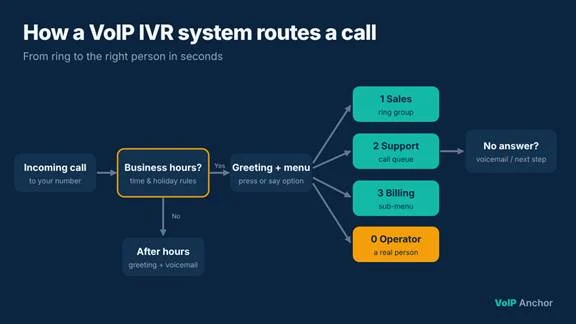
- The call arrives at your VoIP provider. Your number is hosted in the cloud, so the provider’s system answers it, not a phone on a desk.
- Business-hours rules are checked. The system checks the time and date. During opening hours, callers hear the main menu; after hours or on holidays, they hear a different greeting or go to voicemail.
- The caller hears a greeting. This is a recorded message or a text-to-speech voice: “Thanks for calling VoIP Anchor…”
- The caller makes a choice. They press a key on their keypad (DTMF tones) or, with speech recognition, simply say what they need, such as “billing”.
- The system routes the call. Based on the choice, the call goes to a person, a team (ring group), a call queue, a sub-menu, voicemail, or an automated self-service option.
- Fallbacks kick in if needed. If the caller presses nothing, presses a wrong key or nobody answers, the IVR repeats the menu, sends the call to a default destination or takes a voicemail.
Because it all runs in the cloud, the people answering can be anywhere: at the office, at home or on a mobile app.
Key features of a VoIP IVR system
- Multi-level menus: a main menu with sub-menus, such as Support → Billing or Technical.
- Business hours and holiday schedules: different call flows for open, closed and holiday times.
- Text-to-speech and custom recordings: type a greeting and let the system read it, or upload your own professional recording.
- Speech recognition: callers say what they need instead of pressing keys.
- Dial-by-name or extension directory: callers reach a specific person directly.
- Call queues with hold music and position announcements.
- Integrations: connect to your CRM or helpdesk to identify callers or show their history to the agent.
- Analytics: see which options callers choose, where they hang up and how long they wait.
Benefits for small businesses
- Sound professional from day one. A clear menu makes a two-person team sound like an established company.
- Never miss a call. Calls are always answered, even outside office hours.
- Faster routing. Callers reach the right person without being transferred around.
- Lower costs. Fewer calls need a receptionist, and common questions (hours, address, order status) can be answered automatically.
- Easy to change. Update menus, hours or messages from a dashboard, without calling a technician.
Common use cases
| Business type | Example IVR menu |
| Small sales team | 1 Sales, 2 Existing customers, 3 Billing |
| Healthcare clinic | 1 Appointments, 2 Prescriptions, 3 Billing; emergency message first |
| Real estate agency | 1 Buying, 2 Selling, 3 Renting, 4 Property management |
| SaaS or IT support | 1 Technical support, 2 Account and billing, 3 Sales |
| Restaurant | 1 Hours and location, 2 Reservations, 3 Catering |
How to set up a VoIP IVR system
Most VoIP providers include an IVR or auto attendant in their business plans. Setup usually looks like this:
- Map your call flow on paper first. List why people call, who should handle each reason, and what happens after hours.
- Write your greeting and menu script. Keep it short and lead with the most common reason for calling.
- Record or generate the audio. Use text-to-speech for speed, or a professional recording for a polished sound.
- Build the menu in your provider’s dashboard. Assign each key to a person, ring group, queue, sub-menu or voicemail.
- Set business hours and holidays. Create the after-hours flow and holiday dates.
- Add fallbacks. Decide what happens when no key is pressed, a wrong key is pressed or nobody answers.
- Test every path. Call in from a mobile and try every option, inside and outside business hours.
7 tips for an IVR callers won’t hate
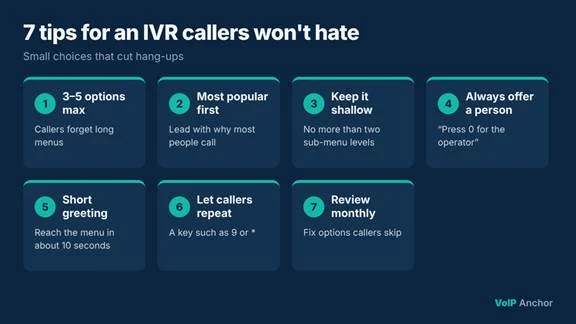
- Keep the main menu to 3–5 options. More than that and callers forget the first one.
- Put the most popular option first.
- Keep it shallow. Avoid more than two levels of sub-menus.
- Always offer a way to reach a person, such as “press 0 for the operator”.
- Keep the greeting short. Get to the menu within about 10 seconds.
- Let callers repeat the menu with a dedicated key, such as 9 or *.
- Review your analytics monthly and rework options that callers skip or hang up on.
Frequently asked questions
What is the difference between IVR and VoIP?
VoIP is the technology that carries calls over the internet. IVR is an automated phone menu. A VoIP IVR system is an IVR that runs on a VoIP phone system.
Do small businesses need a VoIP IVR system?
Not always, but it helps if you get calls for different reasons or departments, or want calls answered after hours. Even a simple two- or three-option menu can save time.
How much does a VoIP IVR system cost?
Many business VoIP plans include a basic IVR or auto attendant. Advanced features such as speech recognition or CRM integrations may cost extra.
Can an IVR understand spoken answers?
Yes, if it supports speech recognition. Callers can say options like “billing” instead of pressing keys.
Can I change my IVR menu myself?
With most VoIP providers, yes. You can update greetings, options and hours from a web dashboard at any time.
Final thoughts
A VoIP IVR system answers every call, sends callers to the right place and makes a small team sound like a much bigger one. The technology is simple; what makes the difference is a well-planned menu. Keep it short, put the most common option first, always offer a way to reach a person, and review how callers use it.

2 Comments