What is SIP ALG on a Router? 6 Signs It’s Breaking VoIP
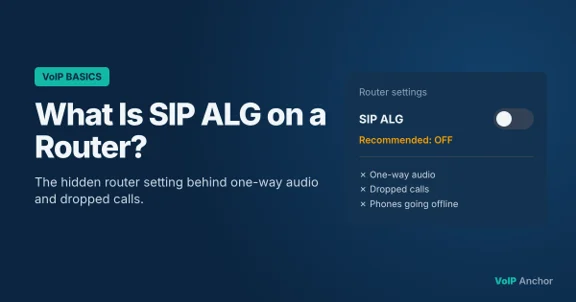
One-way audio, dropped calls or phones that keep going offline? A router setting called SIP ALG is a common culprit. Here’s what it does and how to turn it off.

VoIP Anchor is independent. No provider pays to be featured or reviewed. Our disclosure
On this page
Your internet is fast, your VoIP provider is reliable, yet calls keep breaking up. One side can’t hear the other, calls drop after a few minutes, or desk phones randomly go offline. Before you blame the provider, check one setting on your router: SIP ALG.
It’s switched on by default on many home and small-business routers, and it’s one of the most common causes of VoIP problems. Here’s what SIP ALG is, why it causes trouble, and how to turn it off.
What is SIP ALG?
SIP ALG stands for Session Initiation Protocol Application Layer Gateway. It’s a feature built into many routers and firewalls to help VoIP calls pass through them.
To understand it, you need two pieces of background:
- SIP is the signalling protocol most VoIP systems use to set up, manage and end calls. It’s how your phone tells the provider “I’m here” and “connect me to this number”.
- NAT (Network Address Translation) is what your router does to let many devices share one public IP address. Inside your network, each device has a private address; the router swaps it for the public one on the way out.
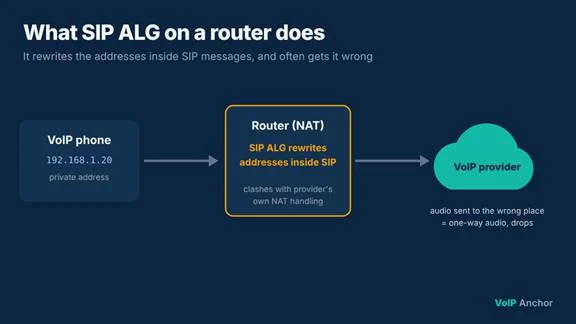
The catch is that SIP messages carry IP addresses inside them, telling the other side where to send the audio. NAT changes the address on the outside of the packet but not the one written inside. The result: the provider sends audio to a private address it can’t reach.
What SIP ALG on a router is supposed to do
SIP ALG on a router was designed to fix that mismatch. It inspects SIP traffic as it passes through the router and rewrites the private IP addresses and ports inside each message so they match the router’s public address. In theory, that lets calls and audio flow correctly.
Why SIP ALG often breaks VoIP calls
In practice, SIP ALG causes more problems than it solves:
- Inconsistent implementations. Every router maker builds its own version, and many are outdated or buggy. Some rewrite the wrong fields or corrupt the message.
- Modern VoIP already handles NAT. Today’s cloud phone providers use their own NAT traversal (session border controllers, keep-alive messages, STUN and similar techniques). When the router also rewrites messages, the two fixes clash.
- It can’t read encrypted SIP. Many providers now encrypt signalling with TLS. A router can’t rewrite what it can’t read, so SIP ALG either does nothing useful or gets in the way.
- It’s on by default. Many ISP-supplied and consumer routers ship with SIP ALG switched on, so most people never know it’s there.
6 signs SIP ALG is causing problems
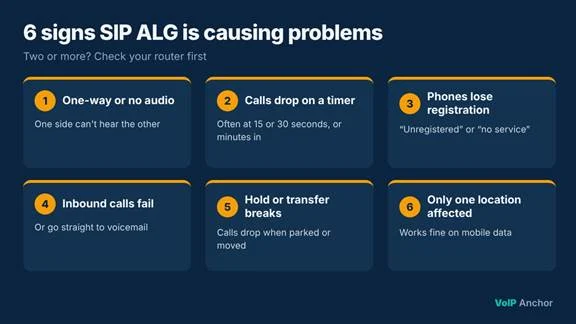
- One-way or no audio: you can hear the caller but they can’t hear you, or neither can hear anything.
- Calls drop at a regular interval, often after 15 or 30 seconds, or after several minutes.
- Phones go offline or lose registration and show “unregistered” or “no service”.
- Incoming calls fail or go straight to voicemail while outgoing calls work.
- Hold, transfer or conference calls break.
- Problems only happen in one location, while the same account works fine on mobile data or another network.
If two or more of these sound familiar, SIP ALG is worth checking first.
Should you disable SIP ALG?
For most people using a cloud VoIP service, yes. Most hosted VoIP providers recommend turning SIP ALG off, because their systems already handle NAT.
The exception: some older on-premises phone systems or specific provider setups rely on the router’s SIP ALG. If your provider explicitly tells you to keep it on, follow their guidance.
How to check and disable SIP ALG on your router
The exact menus differ by brand, but the process is similar on most routers:
- Log in to your router. Type its address into a browser, usually 192.168.0.1 or 192.168.1.1 (it’s often printed on a sticker on the router), and sign in with the admin username and password.
- Find the setting. Look under sections such as Advanced, NAT, WAN, Firewall or Security.
- Look for the right name. Depending on the brand, it may be called SIP ALG, SIP Helper, SIP Passthrough, VoIP ALG or SIP Transformations.
- Turn it off. Untick or disable the option and save your changes.
- Restart the router, then your phones. This clears old connections so phones register again cleanly.
- Test your calls. Make inbound and outbound calls, stay on one for at least 5 minutes, and try hold and transfer.
Can’t find the setting? Some ISP-supplied routers hide it or don’t let you change it. Ask your ISP to disable it, or ask whether you can put their router in bridge mode and use your own. Business firewalls sometimes need the change made through a command line, so check the vendor’s documentation or ask your IT provider.
Still having problems? Ask your VoIP provider whether they support SIP over a different port or over TLS. Routers usually only apply SIP ALG to standard SIP traffic on port 5060.
Frequently asked questions
What does SIP ALG stand for?
SIP ALG stands for Session Initiation Protocol Application Layer Gateway. It’s a router feature that rewrites VoIP signalling messages as they pass through.
Is it safe to disable SIP ALG?
Yes. Turning it off doesn’t affect web browsing, email or other internet use. It only changes how the router handles SIP traffic.
Will disabling SIP ALG fix one-way audio?
Often, yes. One-way audio is one of the most common symptoms of SIP ALG. If the problem continues, check firewall rules and ask your VoIP provider for help.
Does SIP ALG affect mobile VoIP apps?
Only when the app is used on Wi-Fi behind a router with SIP ALG on. On mobile data, the router isn’t involved.
Do all routers have SIP ALG?
Not all, but many consumer, ISP-supplied and small-business routers do, and it’s often on by default.
Final thoughts
SIP ALG was built to help VoIP calls through routers, but with modern cloud phone systems it usually does the opposite. If you’re dealing with one-way audio, dropped calls or phones going offline, checking SIP ALG on your router is one of the quickest fixes to try. Turn it off, restart, test, and you may find your call problems simply disappear.